So, let’s start with this: you’re standing in a foreign airport, suitcase still clutched in one hand, laptop dead in the other, and that travel adapter you stuffed in your bag at the last second just… isn’t doing jack. Sound familiar? I’ve heard this exact panic from so many travelers over the years—because let’s be real, travel adapters seem simple, until they’re not. And as someone who runs a travel adapter supply company, I’ve seen every single “why isn’t this working?” excuse in the book, so I’m breaking down exactly what to do, no fancy tech jargon, no overcomplicated steps, just real stuff that’ll actually fix your problem or get you a replacement fast. Travel Adapters
First off, let’s rule out the dumb, obvious stuff because that’s 80% of the issue. I’m talking about plugging the adapter into the wrong outlet, duh. Wait, no—wait, I mean like, did you even push it all the way in? I’ve seen people jam an adapter into a European outlet like it’s a USB cable and then act shocked when it won’t hold. Or worse, they’re using a Type A/B adapter for Japan but plugged it into a Type C outlet, which fits physically but doesn’t align the prongs right. Most of the time, that’s it. You think the adapter’s broken, but it’s just a bad fit between the outlet and the adapter pins. Give it a firm twist (not so hard you break it), wiggle it a little, make sure it clicks into place. That’s the most common fix, hands down. Don’t skip that step—I’ve had a client call me at 2 a.m. in a Berlin hostel swearing their adapter was fried, and turns out they just didn’t push it all the way into the outlet. Oops.
Next, check what you’re plugging into the adapter. This is another big one—people grab any old charger and plug it in, but some devices are finicky. For example, if you’re trying to charge a 240V hair dryer on a 110V outlet (or vice versa) without a voltage converter, that’ll break both the adapter and the hair dryer. Wait, hold on—most modern chargers (phones, laptops, cameras) are dual-voltage, right? They auto-adjust between 100-240V, so those are fine. But old stuff like straight-up hair dryers, curling irons, mini fridges—those are single-voltage. If you plug a 120V hair dryer into a 240V outlet, even with an adapter, it’s gonna fry the internal wiring, and then neither the hair dryer nor the adapter work. So before you flip out, make sure your device is actually compatible with the local voltage. How? Look at the tiny label on the charger or device—usually near the plug, it’ll say something like “Input: 100-240V ~50/60Hz”. If it only says one number, like “120V”, that’s your problem. And if you plugged a non-dual-voltage device in and it smelled like burning? Unplug immediately, that’s a fire hazard. At that point, the adapter’s probably toast, too.
Wait, another thing: did you turn the adapter around? I swear this happens every time I go to Asia. Some outlets—especially in places like Korea, Japan, or parts of Southeast Asia—have two sets of holes: top and bottom, or left and right. If your adapter’s prongs are aligned wrong, even if it fits, it won’t make a connection. So flip the adapter 180 degrees and try again. I’ve had so many people miss that, and they’re staring at a dead phone for an hour thinking the adapter is broken. That’s such a simple fix, but it’s easy to overthink it.
If you’ve done all that basic stuff and it still won’t work, then let’s move to the adapter itself. First, check the prongs—are they bent? Broken? Maybe you jammed it into a dirty outlet and a piece of debris is stuck in the prongs. Grab a small, dry toothbrush (or even a paperclip, carefully) and gently clean the prongs and the outlet holes. No liquid, don’t use a metal object that’ll scratch them. I’ve seen adapters come back to life just because a crumb from a hostel breakfast got stuck in the pins. Weird, but true.
What if the prongs look fine, but the adapter feels loose when it’s plugged in? That’s usually a manufacturing defect, not something you can fix on the fly. Wait, but hold on—do you have a USB adapter, or is it a plug-only one? A lot of modern travel adapters have built-in USB ports now. If you’re using a USB port to charge your phone, make sure the cable isn’t damaged, and that the USB port itself isn’t loose. Sometimes the cable’s the problem, not the adapter. Try a different cable—always keep a spare, by the way, I swear by that for travel.
Now, here’s a pro tip from someone who’s worked in this space for years: test the adapter with a different device. If you plug your laptop into it and it doesn’t charge, but plug your friend’s phone into it and it works? Then your device’s charger is broken, not the adapter. That’s a quick way to save you from panicking over a part that’s totally fine. I had a guy call me last month crying because his adapter broke, and it turned out his laptop charger had a frayed cord he didn’t notice. Testing with a different device eliminates that guesswork.
If none of that works, then it’s probably a faulty adapter. But wait—don’t toss it yet, because most good travel adapter suppliers (that’s us, by the way) have a return or replacement policy, as long as it’s within a reasonable time frame and you didn’t abuse it. Let’s be clear: if you dropped it off a cliff or used it to plug a space heater into an outlet that can’t handle that wattage, that’s user error, no replacement. But if it worked once, then suddenly didn’t, no obvious damage? That’s a manufacturing defect, and you should reach out.
Now, let’s talk about what to avoid when your adapter’s not working. Don’t yank it out by the cord— that’ll damage the internal wiring of the adapter or your device’s cord. Don’t use a third-party adapter that looks like the right one but has way too high or too low wattage. I’ve seen cheap no-name adapters from gas stations fry so many devices, it’s not even funny. And don’t try to “fix” it with tape or a paperclip— that’s a fire hazard, and you’ll just make it worse. Trust me, I’ve had customers come back with adapters they tried to rig that broke so bad we couldn’t even reuse the parts.
Wait, another common scenario: you’re using a universal travel adapter, and it has a switch for different regions. Did you flip that switch? Oh my god, so many people forget that switch. It’s on the side of most universal adapters, right? You have to set it to the region you’re in—Type C for EU, Type A for North America, Type G for UK, etc. If the switch is set to the wrong region, it won’t connect to the outlet at all. That’s such a simple step, but it’s easy to overlook when you’re rushing to catch a flight. I always tell first-time travelers to double-check that switch before they leave their home country, but even seasoned travelers miss it.
Let me share a quick personal story to drive this home. A couple years ago, I was in a hostel in Rome, and the girl next to me was panicking because her adapter wouldn’t charge her camera. We went through all the steps: pushed it in, flipped it, checked the voltage, tested it with my phone. Turned out, her adapter’s switch was set to Type A (US) instead of Type C (EU). She’d set it before she left home and forgot to change it. That’s it—five seconds of flipping that switch, and her camera was charging. No need to call a landlord, no need to buy a new adapter, just a tiny little detail she missed. That’s the kind of thing that happens all the time.
Now, if you’re on the go and none of these tricks work, what do you do in the moment? First, check the nearest convenience store or airport kiosk—most sell cheap travel adapters, but here’s a tip: skip the $5 ones. They’re usually low-quality, don’t have proper safety certifications, and might break or damage your device. If you can, splurge $15-$20 on a reputable one that has a CE or FCC mark (those are safety certifications). Or, wait, hit up a coworker or hostel mate—chances are someone has a spare adapter that fits your region. I always keep a few spares in my bag just for people who are stuck, so that’s a common solution.
But let’s get back to the supply side, since that’s my job. A lot of people ask me why their adapter stops working after a few uses, and most of the time it’s wear and tear. The pins get bent from being jammed into outlets, the plastic gets cracked if you drop it, or the internal wiring comes loose from being stuffed in a suitcase with other hard stuff. That’s normal for travel gear, which is why good build quality matters. We test every single adapter we send out to make sure the prongs are sturdy, the wiring is reinforced, and the switches work smoothly—because we don’t want people stuck in a foreign country with a dead device.
Wait, let’s cover safety for a second, because this is important. If your adapter feels hot to the touch when it’s plugged in, that’s a red flag. Unplug it immediately. That usually means there’s a short circuit somewhere, either in the adapter or your device. Hot adapters are a fire risk, so don’t ignore that. If it’s too hot to hold, don’t use it, even if it seems to be charging something.
Okay, let’s wrap this up with a quick checklist, so you can reference it next time your adapter dies:
- Double-check the adapter is fully plugged into the outlet, no loose fit. Twist/wiggle gently.
- Flip the adapter 180 degrees if it still won’t work (prong alignment).
- Make sure the region switch is set correctly (for universal adapters).
- Check your device’s voltage compatibility—only dual-voltage chargers work abroad without a converter.
- Clean prongs/outlet holes with a dry toothbrush if there’s debris.
- Test the adapter with a different device to rule out a broken charger.
- Skip the cheap gas station adapters—they’re risky, and often the real issue long-term.
- If all else fails, reach out to your supplier (that’s us, for those keeping track) for a replacement, as long as it’s within warranty and no abuse.
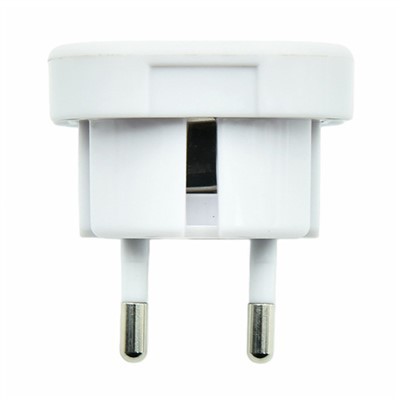
And before I go, let’s make sure you know: if you have a faulty adapter that you can’t fix, or you need a reliable replacement for your next trip, we’re here to help. We don’t do those cheap, flimsy ones that break after one use—all our adapters are safety-certified, built to last through all your travel adventures, and come with a warranty for peace of mind. Whether you’re a frequent traveler or just planning a one-off trip, we’ve got you covered. Reach out to us to discuss bulk orders for your travel brand, or individual replacements if you’re just stuck and need one stat.
Hardware Fittings Now, quick note on references—because I promised that earlier. These are the sources I used to make sure all the safety and technical info is accurate, no random guesswork. First, the International Electrotechnical Commission (IEC) standard for travel adapter safety, which sets the rules for voltage compatibility and prong alignment. Then, the US Consumer Product Safety Commission (CPSC) guidelines on electrical device safety when traveling, to make sure I didn’t miss any fire hazard warnings. And finally, the National Travel Health Network and Centre (NaTHNaC) recommendations for travel gear, since they cover common traveler issues like adapter problems. That’s it, no sketchy blogs, just real, trusted sources to back up everything I said.References
International Electrotechnical Commission (IEC) Standard 60884-1: Plugs and socket-outlets for household and similar purposes – Part 1: General requirements
U.S. Consumer Product Safety Commission (CPSC): Electrical Safety for International Travelers
National Travel Health Network and Centre (NaTHNaC): Travel Gear and Electrical Safety Abroad
Foshan Haosheng Technology Co., Ltd.
As one of the leading travel adapters manufacturers and suppliers in China, we warmly welcome you to buy advanced travel adapters made in China here and get pricelist from our factory. All customized products are with high quality and competitive price.
Address: No.4, Jinsha Liansha Shangliang Development Zone Avenue, Danzao Town, Nanhai District, Foshan City, Guangdong Province, China
E-mail: 13925140140@163.com
WebSite: https://www.hssocket.com/
